
2houses | Co-Parenting App
2housesParenting
3.2127.00 Reviews
- Version
- 4.10.12
- Installs
- 100.00K
- Age Rating
- Everyone
Screenshots
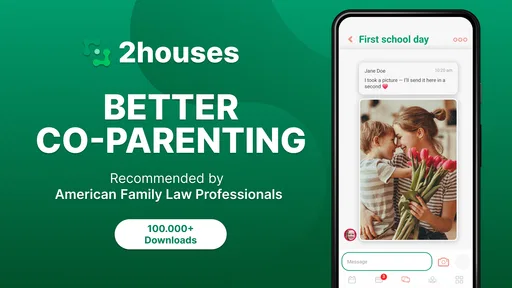
Our Review of 2houses | Co-Parenting App
 Analysis by Appyee
When I look at a co-parenting app, I start with a practical question: will it reduce the number of places where plans, messages, and child-related costs get scattered? That matters more than a long feature list. 2houses is aimed at parents who need a shared way to coordinate life across two households, rather than another general calendar or chat app. I find that focus useful, but it also means the app makes most sense when both parents are willing to use it consistently.
The basic idea is to keep the everyday logistics of co-parenting together: schedules, expenses, and communication. That can be a real relief when a school event is discussed in one message thread, a handover change in another, and a receipt is sitting in someone’s camera roll. The app is free to download, though it offers in-app purchases ranging from $17.99 to $169.99 per item, so I would check the current options before treating it as a no-cost long-term arrangement.
Choose it for coordination, not for a new calendar alone
I see the strongest case for 2houses when co-parents need a shared routine and a central place to check what has been agreed. Its appeal is less about replacing every tool on your phone and more about giving child-related planning a dedicated home. If you already coordinate smoothly with a shared calendar and calm, reliable messages, moving everything may not improve much. If details routinely get lost between texts, email, and memory, a dedicated organizer has a clearer purpose.
It is a parenting app developed by 2houses, and it has been available since March 7, 2015. Its current version is 4.10.12, and it requires Android 7.0 or later. The app is free, is rated for Everyone, and has passed 100K installs. Its average is 3.2 from 583 ratings, with 127 written reviews. I would treat that rating as a reason to approach it with measured expectations: the idea may fit a family well, but a shared tool only helps if its day-to-day workflow suits both people.
The Ultimate Co-Parenting Tool
First things first, the interface of 2houses is super user-friendly. Even if you're not the most tech-savvy person, navigating this app is as easy as pie. You can tell that it’s been designed with the non-techy parent in mind, which is a huge plus in my book.
Features at a Glance
This app is packed with a bunch of features that cover all the bases of co-parenting. Let’s break down the most significant ones:
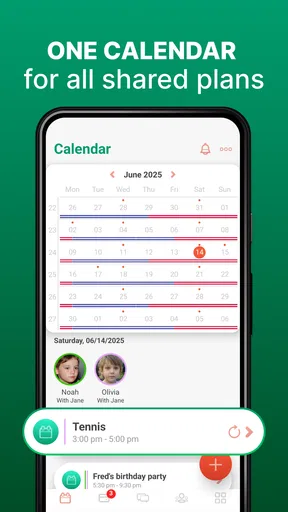
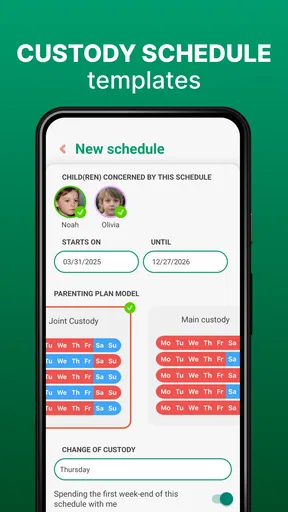
- Shared Calendar
- The shared calendar is a game-changer. It allows you to schedule everything from doctor’s appointments to school events. Both parents can add or edit events, so everyone stays in the loop.
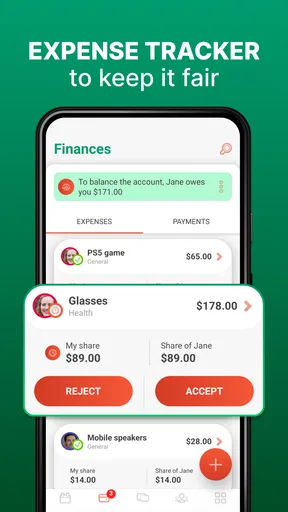
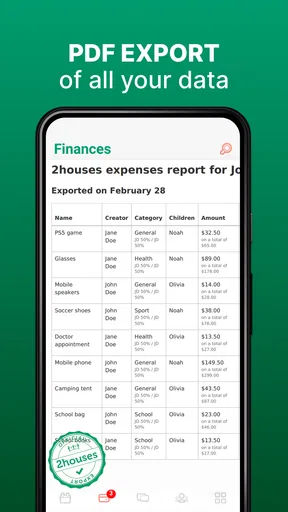
- Expense Tracking
- Money conversations can be tricky, but with the expense tracker, you can log all expenses and even upload receipts. It keeps everything transparent and eliminates unnecessary disputes.
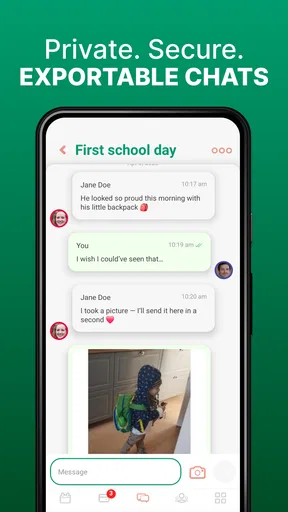
- Messaging
- No more endless email threads or lost text messages. The in-app messaging keeps all your conversations in one place. Plus, it’s private and secure, just as it should be.
- Journal
- The journal feature is a lovely touch. You can jot down notes, thoughts, or any important events. It’s a nice way to keep track of memories or important details that might otherwise slip through the cracks.
Where the shared record can help
The calendar and expense log are most useful when they contain the small details that tend to cause avoidable confusion. For an appointment, I would record the time, location, and who is handling transport rather than just the event name. For a shared cost, I would add the receipt close to the purchase and write a plain description of what it covered. That simple habit makes the record easier to understand later, especially if either parent is reviewing several weeks at once.
A realistic example is a school trip announced midweek. One parent can add the date and any relevant timing to the calendar, while the other can check it before arranging their own plans. If a fee is paid, logging the expense and attaching its receipt gives both households a common reference. The point is not to turn parenting into administration; it is to reduce the number of times someone has to ask, “Was that already paid?” or “Who is taking them?”
The journal can serve a different purpose from the calendar. I would use it for context that does not need to become a scheduled event, such as a brief note about something important to pass on after a handover. Keeping that note factual and concise is a useful trade-off: it makes the record easier to scan and less likely to become a running commentary. A calendar entry answers when; a journal note can preserve a detail that might otherwise be forgotten.
Where this app earns its place
For parents who are already communicating politely but losing track of logistics, the shared structure is the main benefit. A dedicated thread for co-parenting messages can make it easier to find the conversation about a particular arrangement than searching through unrelated texts. The value is especially clear when schedules change often, several adults help with childcare, or expense records need to be checked later.
The option to add third parties can help when a grandparent or babysitter needs practical information. I would use that access thoughtfully: share only what that person needs to carry out their role, and agree with the other parent on who should be included. More participants can make coordination easier, but they can also create extra notifications and more places where plans might be misunderstood. A smaller, clearly defined circle is often easier to manage.
Notifications are another area where a little setup matters. I would keep alerts for changes that affect an immediate handover or appointment, while turning down less urgent updates if they distract from the day. The aim is not to receive every signal; it is to notice the ones that require action. If both parents choose sensible settings and agree to check the shared space regularly, the app can support a routine without demanding constant attention.
Features at a Glance
This app is packed with a bunch of features that cover all the bases of co-parenting. Let’s break down the most significant ones:
- Shared Calendar
- The shared calendar is a game-changer. It allows you to schedule everything from doctor’s appointments to school events. Both parents can add or edit events, so everyone stays in the loop.
- Expense Tracking
- Money conversations can be tricky, but with the expense tracker, you can log all expenses and even upload receipts. It keeps everything transparent and eliminates unnecessary disputes.
- Messaging
- No more endless email threads or lost text messages. The in-app messaging keeps all your conversations in one place. Plus, it’s private and secure, just as it should be.
- Journal
- The journal feature is a lovely touch. You can jot down notes, thoughts, or any important events. It’s a nice way to keep track of memories or important details that might otherwise slip through the cracks.
Where alternatives may fit better
Compared with a general-purpose calendar, 2houses is more focused on the co-parenting relationship: costs and messages sit alongside the schedule rather than being managed in separate apps. The trade-off is that a general calendar may be a better fit for someone who only needs to share dates and already has a process for everything else. If the main problem is communication, a messaging app may feel more familiar; if the main problem is keeping appointments visible, a shared calendar may be enough.
Those alternatives are not automatically better. They can mean maintaining several records and deciding which one is authoritative when details differ. A dedicated organizer can reduce that fragmentation, but only if both parents agree to use it as the place to check and update plans. If one person continues to make changes only by text, the app may become one more channel rather than the shared source of truth.
I would also be cautious about expecting a planning tool to settle disagreements. Expense entries and saved messages can make facts easier to review, but they do not replace an agreement about how costs are divided or how schedule changes are handled. The app is most helpful for documenting and communicating decisions already made; it cannot make an uncooperative arrangement cooperative on its own.
Room for Improvement
Now, no app is perfect, right? While I’m mostly singing praises, there are a couple of things that could use a little tweak. For starters, I’d love to see more customization options in the calendar. Being able to color-code events by child or activity would be a neat addition.
Also, the app could benefit from a more robust tutorial for first-time users. While it’s intuitive, a guided tour through all the features could help new users get up to speed faster.
Making the switch manageable
Switching works best as a small, agreed change rather than a sudden demand that every old conversation be recreated. I would start by choosing a date from which new appointments, costs, and practical messages go into the app. Then I would add only the upcoming events that still matter. That avoids spending an evening copying old history that neither parent is likely to consult.
Before relying on it for a handover, both parents should agree on a simple routine: who adds appointments, how quickly changes should be entered, and where urgent changes are communicated. A shared calendar is not a substitute for a direct heads-up when timing is tight. Likewise, for expenses, deciding what information to include in each entry can prevent a bare amount from prompting another round of questions.
There is also a human cost to switching. If one parent sees a new app as a way to monitor or score the other, even a well-organized record can make conversations feel more tense. I would introduce it as a practical convenience for both households, agree on what belongs there, and avoid using the journal or message history to keep score. If that shared understanding is not possible, a simpler arrangement may create less friction.
Why I Love It
One of my favorite features is the ability to add third parties to the app. This means grandparents, babysitters, or anyone else involved in your child's life can be kept in the loop. It’s a small detail, but it makes a big difference in managing everyone’s expectations and responsibilities.
Another aspect that stands out is the notifications. You can customize what you want to be notified about, so you’re not bombarded with constant alerts. But when something important pops up, you’re right on it.
Is it a fit for your family?
I would recommend trying it if the recurring headache is coordination across households: unclear handover details, appointments that are easy to miss, or shared costs that become difficult to trace. It is also a sensible option when a trusted caregiver needs selected practical updates. The app’s parenting focus gives those tasks a shared context that a collection of unrelated tools often lacks.
I would skip it, or at least compare it with a basic shared calendar first, if you only need to exchange a few dates, if the other parent will not participate, or if introducing another channel would make communication more stressful. It may also be the wrong choice for someone who wants extensive calendar customization, given my wish for clearer color-coding. The useful question is not whether it has many tools, but whether both households will maintain the same routine.
Because the app offers in-app purchases, I would explore how the free experience meets your needs before paying for anything. Decide which tasks you actually expect to use, then discuss that choice with the other parent instead of assuming every feature is necessary. That keeps the decision grounded in your family’s routine and makes any purchase easier to evaluate together.
Is It Worth It?
So, the big question: is 2houses worth downloading? In my opinion, absolutely. It offers a comprehensive suite of tools that can really make a difference in how you manage co-parenting. The peace of mind it provides by having everything organized in one place is invaluable.
Whether you’re dealing with a straightforward co-parenting situation or something more complex, this app can help bridge communication gaps and streamline your planning. It’s like having a personal assistant right there on your phone.
If you’re ready to take the plunge, you can find the download links for both Android and iOS on our site. Go ahead, give it a whirl, and let me know what you think! Happy co-parenting!
Verdict
Strengths of 2houses | Co-Parenting App
- Intuitive interface makes navigation easy.
- Real-time updates keep both parents informed.
- Shared calendar for seamless scheduling.
- Expense tracking simplifies financial management.
- Messaging feature ensures private communication.
Limitations of 2houses | Co-Parenting App
- Limited free features; subscription needed.
- Occasional sync issues reported by users.
- No offline mode available for key features.
- Some features require internet access.
- Initial setup can be time-consuming.
Similar Picks in This Category
View All
Family Space
Motorola Mobility LLC.3.9

شرطة الأطفال - مكالمة وهمية
Oub Apps4.1

Findmykids: Parental Control
LETEM LTD4.6

Pregnancy + | Tracker App
Philips Electronics UK Limited4.8

Policía de niños - para padres
Kids police4.7

Pregnancy App
Amila4.9
Frequently Asked Questions
What is the main purpose of the 2houses app?
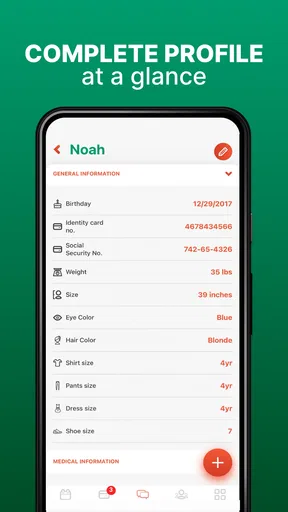
The 2houses app is designed to facilitate communication and organization for co-parents. It helps manage schedules, expenses, and important information regarding children, making co-parenting smoother and less stressful. The app aims to reduce conflict by providing a shared platform for both parents to stay informed and coordinate effectively.
How does the calendar feature in 2houses work?
The calendar feature allows both parents to input and sync schedules, including custody arrangements, special events, and appointments. It provides reminders and notifications, ensuring that both parents are always aware of important dates and changes. This feature helps prevent miscommunications and scheduling conflicts.
Can 2houses help with managing financial responsibilities?
Yes, the app includes a financial management tool that allows parents to track and share expenses related to their children. Users can document payments, request reimbursements, and keep a detailed record of all transactions, ensuring transparency and accountability in financial matters between co-parents.
Is the 2houses app secure and private?
Security and privacy are top priorities for the 2houses app. It employs advanced encryption and security measures to protect user data. Only the co-parents have access to their private information, and the app complies with all relevant privacy laws, ensuring that your and your children’s data is safe.
What platforms is 2houses available on, and is there a cost?
2houses is available for both Android and iOS devices. While the app offers a free version with basic features, there is also a premium subscription that unlocks additional functionalities, such as advanced reporting and priority support. Users can choose the plan that best fits their co-parenting needs.
